Automating Math Input in WinUI 3
A Practical Guide to NPT and Unicode Injection
To add math input to your WinUI 3 application, start with the RichEditBox
control. Since Windows App SDK 1.7, it supports a new feature called
RichEditMathMode, which allows the control to interpret and convert text into MathML in
real time. For example, typing \pi renders as π, and 1/2 becomes ½.
MathEditor.TextDocument.SetMathMode(RichEditMathMode.MathOnly);
You don’t need to write MathML manually. Instead, it uses a system called Nearly Plain Text
Unicode (NPT), a structured input format that maps common math sequences (like \infty, \sum, \sqrt, etc.) to Unicode symbols. These symbols are then rendered as MathML
behind the scenes.
Why is this necessary? Because many math symbols (like integrals, Greek letters, or arrows) aren’t available on any physical keyboard. NPT acts as a semantic shorthand, making it possible to input complex formulas with plain text.
There are two things you must understand to use this effectively:
- Learn the available NPT input sequences (Unicode math tables).
- Trigger rendering by sending a
U+0020(space) or pressing Enter, this finalizes the math input and forces the control to parse and render it properly.

The problem is, if you're building an app that involves math input, you can’t expect users to
memorize the entire NPT Unicode spec, unless your target audience is a group of monks
who’ve taken a vow to speak only in NPT Unicode  .
.
Let’s be real: users want to click π button and see π, not study a Unicode
textbook.
So, what’s the solution? You do the typing for them.
But here’s the catch: WinUI 3 / Windows App SDK doesn’t provide a built-in way to inject raw
Unicode characters into a RichEditBox, especially not in a way
that triggers MathMode rendering.
That’s where the Win32 SendInput API comes in.
SendInput is a low-level Windows API that lets you simulate
keyboard or mouse input, just as if the user typed it. It bypasses the limitations of
the high-level UI frameworks by writing directly to the input buffer of the focused window.
In this case, we use it to:
- Send Unicode characters (not keycodes or key names)
- Trigger special math input sequences programmatically
- Mimic real user input to activate RichEditBox’s MathMode rendering
Behind the scenes, we create and dispatch a series of synthetic keyboard events (keydown and keyup) for
each Unicode character. This lets us inject unicode chars and sequences like \u03C0 or \u25A0(1&&@&1&@&&1) directly into the
control, no physical keyboard needed, no language switching required.
It’s a bit hacky, but it works flawlessly, and it’s the only reliable way to automate Unicode math input
in a RichEditBox as of today (This is the best I could do, for now ).
Demo App
To make all of this less abstract, I built a small demo app that shows how to
automate math input in RichEditBox using SendInput.
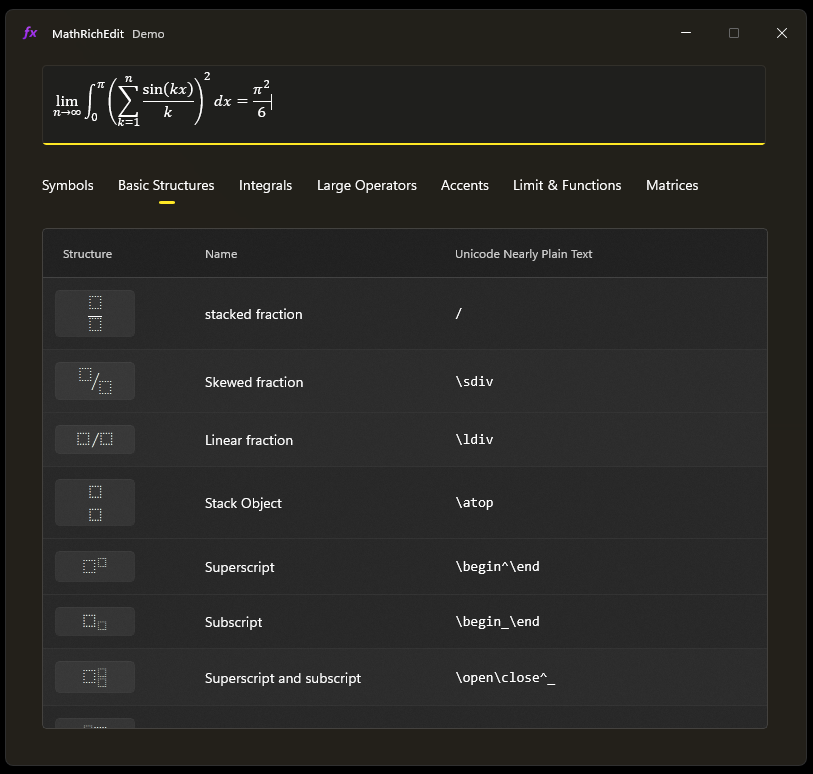
 Check out the code here:
MathRichEdit-Demo
Check out the code here:
MathRichEdit-Demo
If you find it helpful, a  on GitHub would
make me way too happy
(seriously, it feeds my ego).
on GitHub would
make me way too happy
(seriously, it feeds my ego).